配置 HTTPS
📖
扩展阅读
:::重定向所有的站点到 https
通过在 nginx.conf 文件中添加以下内容,将所有非安全(HTTP)请求重定向到使用 HTTPS 连接的服务器上配置的任何站点
Plaintext
server {
    listen 80 default_server;
    server_name _;
    return 301 https://$host$request_uri;
}
server_name 的值 _, 匹配所有的主机名称.
使用重定向
首先配置支持 HTTPS 必须让 Nginx 开启 http_ssl_module 模块,点击查看 Nginx 编译选项 ,可以使用nginx -V查看是否开启TLS SNI support enabled。购买/生成 SSL 证书,可以使用免费的证书,在这里申请就很可以 腾讯云 SSL 证书
Plaintext
# 配置 HTTPS
# 配置个http的站点,用来做重定向,当然如果你不需要把 HTTP->HTTPS 可以把这个配置删了
server {
    listen 80;
    # 配置域名
    server_name domain.com www.domain.com;
    # 配置让这些 HTTP 的访问全部 301 重定向到 HTTPS 的
    return 301 https://domain.com$request_uri;
}

# 配置 HTTPS
server {
    listen 443 ssl;
    server_name www.domain.com domain.com;
    # https
    ssl_certificate https/domain.com.crt;
    ssl_certificate_key https/domain.com.key;
    # other setting
}
注意,这里证书的格式是 .crt 的。
善用变量
Plaintext
server {
    # ....
    if ($https = '') {
        return 301 https://domain.com$request_uri;
    }

    # ...
    # 去掉 www 后的访问
    if ($host = 'www.domain.com'){
        return 301 https://domain.com$request_uri;
    }
}
配置后的访问规则
对于网站需要 https 和 http 共同来访问的可以
Plaintext
server {
    listen 80;
    listen 443 ssl;
    server_name www.domain.com domain.com;
}
国密 ssl
查看证书的 ssl 签名
Bash
openssl x509 -in ./218.60.153.244.crt -text -noout返回证书的签名信息
Plaintext
Certificate:
    Data:
        Version: 3 (0x2)
        Serial Number: 10074591 (0x99b9df)
        Signature Algorithm: SM2-with-SM3
        Issuer: C=CN, CN=CHINA UNICOM SM2 CA_TEST
        Validity
            Not Before: Jun 13 02:59:43 2024 GMT
            Not After : Dec 13 02:59:43 2024 GMT
        Subject: C=CN, ST=Liaoning, L=Shenyang, O=辽宁省粮食和物资储备局, CN=218.60.153.244
        Subject Public Key Info:
            Public Key Algorithm: id-ecPublicKey
                Public-Key: (256 bit)
                pub:
                    04:81:20:1d:61:5e:fc:5e:ad:3e:10:c5:4c:e4:f6:
                    da:b8:7a:b5:f3:80:ef:b1:f3:9a:66:6e:58:96:2a:
                    75:4b:50:ef:e5:3b:cf:d3:f1:76:91:ee:f0:b2:ef:
                    5f:dc:1a:9f:33:e8:9a:06:e8:ed:dd:60:27:57:80:
                    cf:ea:10:00:9c
                ASN1 OID: SM2
        X509v3 extensions:
            X509v3 Extended Key Usage: critical
                TLS Web Client Authentication, TLS Web Server Authentication
            X509v3 Authority Key Identifier:
                E0:62:52:94:44:1E:FE:48:C6:21:42:6D:35:37:D8:19:F9:1F:45:E7
            X509v3 Key Usage: critical
                Digital Signature, Non Repudiation, Key Encipherment, Data Encipherment, Certificate Sign
            X509v3 Subject Key Identifier:
                93:5D:EE:45:19:95:5B:A6:37:29:70:8B:EB:46:E7:1A:0D:24:27:BE
            X509v3 Basic Constraints:
                CA:FALSE
            X509v3 Subject Alternative Name:
                IP Address:218.60.153.244
    Signature Algorithm: SM2-with-SM3
    Signature Value:
        30:44:02:20:72:2a:9a:b5:d9:0d:20:bd:4a:17:b5:7d:79:48:
        63:68:83:e2:78:ff:8e:94:44:2f:4e:23:3f:04:e3:27:63:f0:
        02:20:78:9c:18:d7:bd:c4:f5:7f:4c:30:9d:3f:89:34:5d:93:
        ef:61:ee:ae:ea:e8:68:38:d2:3b:7d:1f:e7:8d:96:f9
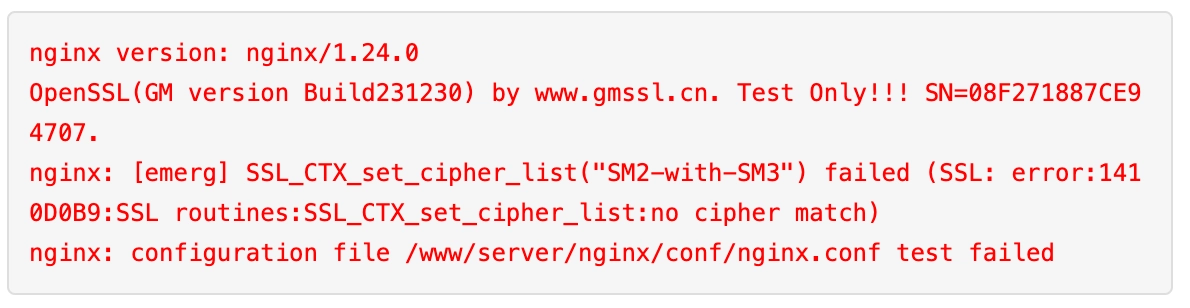
在配置的时候如果 nginx 不支持此签名证书则会报如下的错误