
如果你使用 Laravel 内置的 LoginController 类,Illuminate\Foundation\Auth\ThrottlesLogins trait 已经包含在该控制器中了。默认情况下,如果用户多次尝试却无法提供正确的登录凭据,那么该用户在指定的时间内将不能再次尝试登录。这种限流策略基于用户的用户名:IP 地址的唯一性
自定义尝试次数和周期时间
系统已为我们提供了限制功能,那么如何自定义可尝试的次数和时间呢
找到 Illuminate\Foundation\Auth\ThrottlesLogins trait ,我们可以看到这个方法
php
public function maxAttempts()
{
    return property_exists($this, 'maxAttempts') ? $this->maxAttempts : 5;
}

public function decayMinutes()
{
    return property_exists($this, 'decayMinutes') ? $this->decayMinutes : 1;
}
由于 LoginController 默认使用了这个方法,我们可以很方便的在 LoginController 中加上:
php
/**
 * 最大请求次数 10 次
 * @var float|int
 */
protected $maxAttempts = 2;

/**
 * 30 秒内, 最多 10 次请求
 * @var float
 */
protected float $decayMinutes = 0.5;
这里指的是在 $decayMinutes 分钟内限制 $maxAttempts 次请求, 可以根据我们的需要灵活配置
定义用户名
用户名方法的定义用于异常提示和限制性 key 的生成, 我们可以看到如下方法
php
// 抛出错误异常
throw ValidationException::withMessages([
    $this->username() => [Lang::get('auth.throttle', [
        'seconds' => $seconds,
        'minutes' => ceil($seconds / 60),
    ])],
])->status(Response::HTTP_TOO_MANY_REQUESTS);

// 获取限流的key
protected function throttleKey(Request $request)
{
    return Str::lower($request->input($this->username())).'|'.$request->ip();
}
这里我们需要在 LoginController 中定义 username() 方法, 用来返回传递参数的 key
php
protected function username(): string
{
    return 'passport';
}
流程
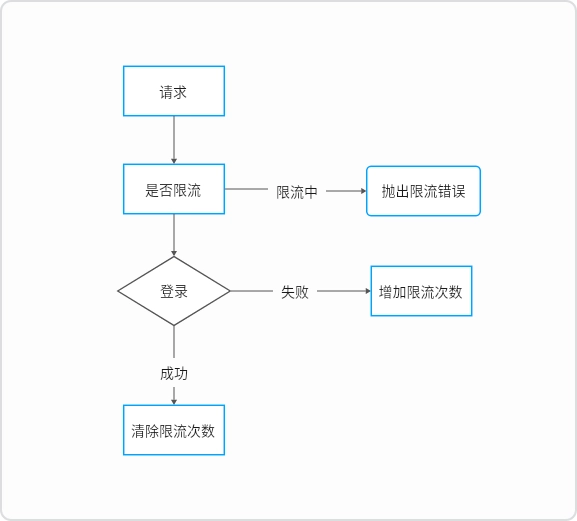
代码部分, 我们首先检查是否存在限制
php
// 检查是否限制
if ($this->hasTooManyLoginAttempts($request)) {
    $this->sendLockoutResponse($request);
}
如果失败了, 我们增加尝试登录次数
php
$this->incrementLoginAttempts($request);
如果成功了, 我们清除登录次数
php
$this->clearLoginAttempts($request);
交流与讨论